Case study · 2025—2026 · In production
Donckers ERP
A modular ERP that runs sales, purchasing, production, warehouse and HR for a Belgian packaging manufacturer with two operating companies — on one deployment, one permission model and one audit trail.
49
modules
From order intake to payroll-ready hours
7
domains
Sales, purchasing, production, warehouse, HR and more
2
operating companies
One deployment, data kept strictly apart
2025
in production since
Running the plant every day
The problem
Off-the-shelf ERP fits the vendor, not the factory
The plant was running on a mix of spreadsheets, a legacy tool nobody could change, and a lot of paper walking across the floor. The things that mattered most — which job is on which machine, which pallet came from which delivery, who is on shift on Thursday — lived in people’s heads.
Generic ERP packages could cover maybe two thirds of it. The remaining third is exactly the part that makes this a packaging plant rather than a warehouse: die tooling, label templates driven straight to the printers, food-safety evidence, and a second legal entity sharing the same building and the same people.
So it was built instead — one module at a time, each one replacing something that was already being done by hand, and each one in production before the next one started.
The system
Five screens that carry most of the day
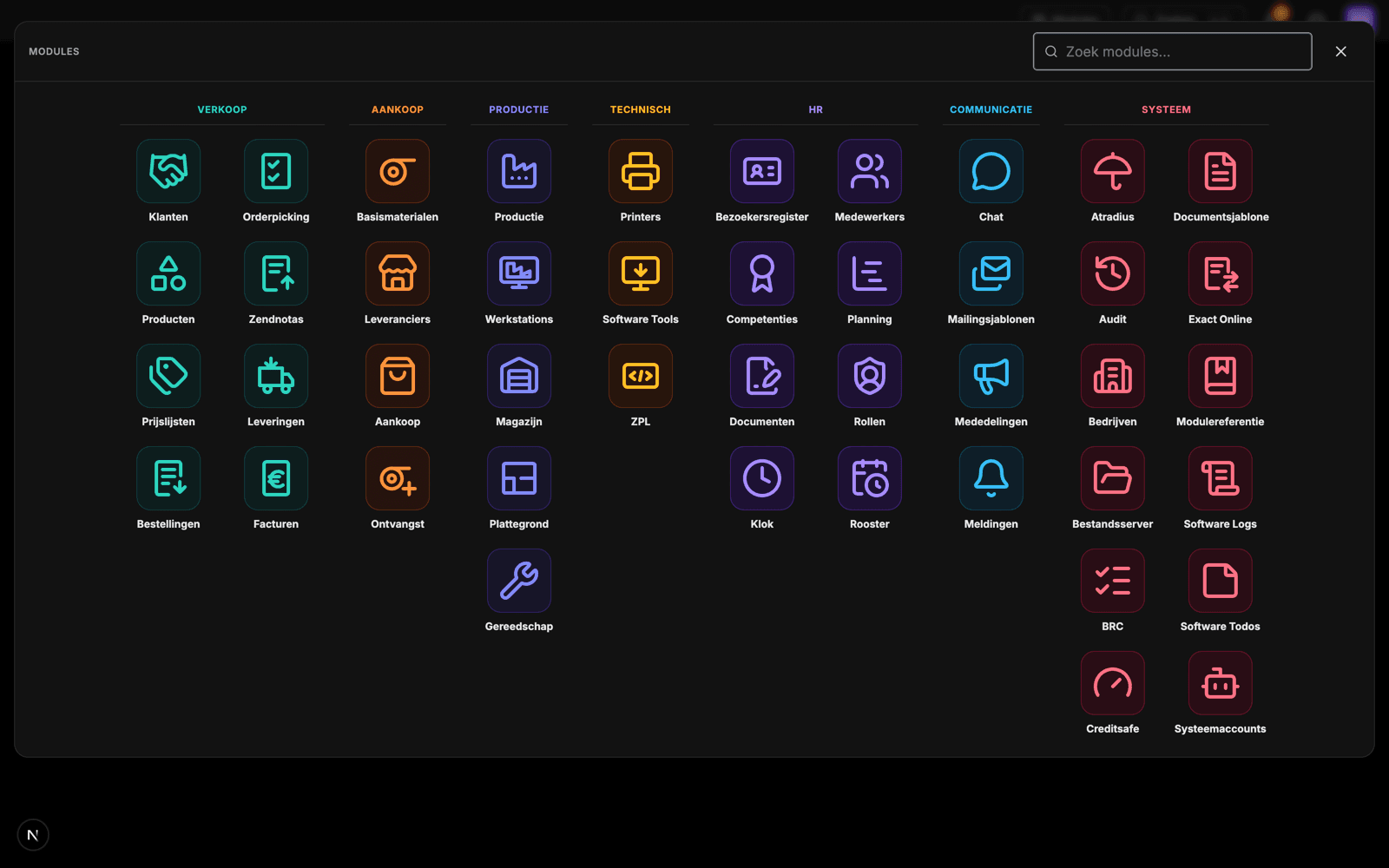
Every module, one keystroke away
The launcher groups all 49 modules by domain and colour. Staff only see what their role grants them, so the same screen is a different application for a planner, an operator and an accountant.
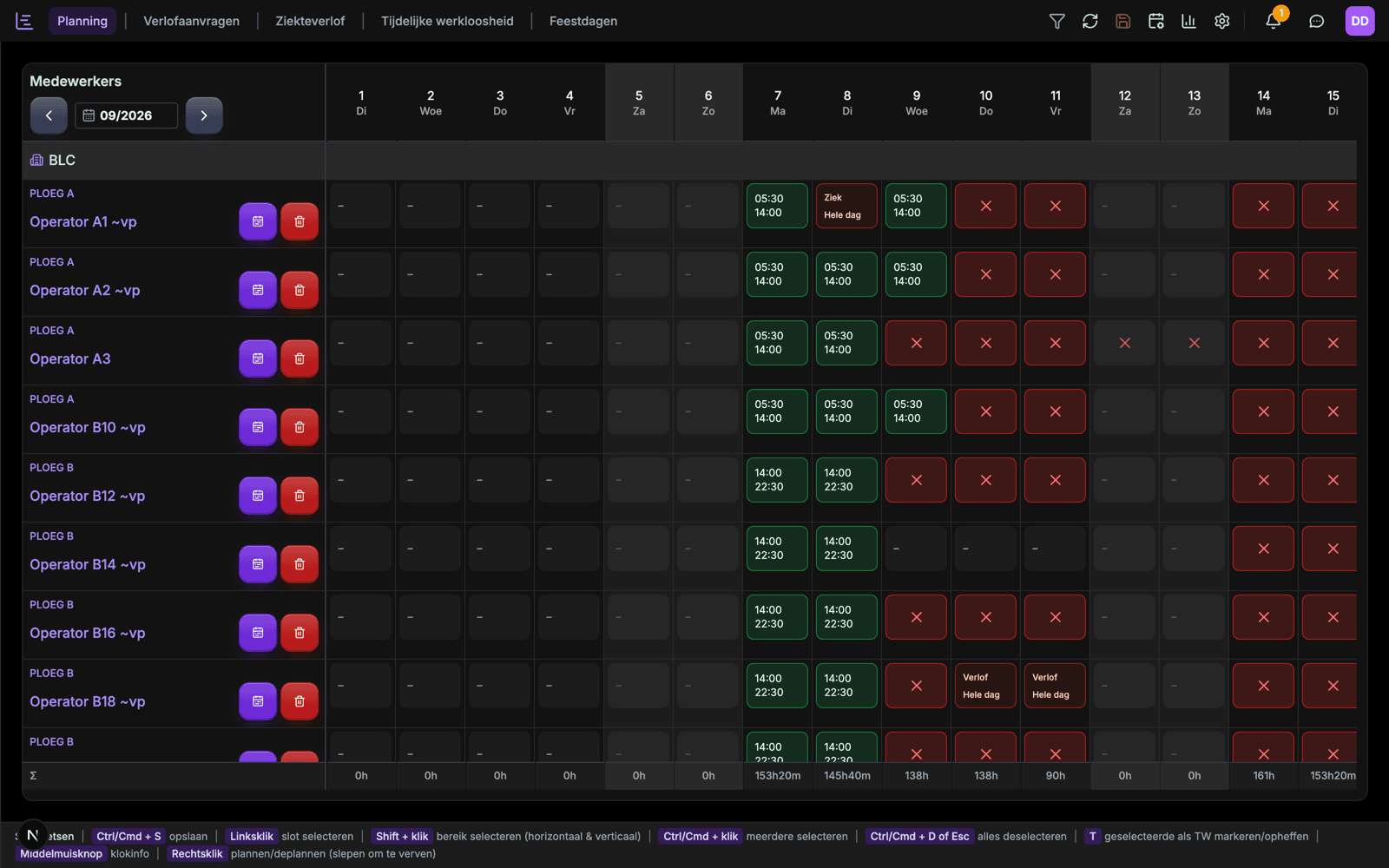
Shift planning that the floor actually runs on
A month of shifts per team, with leave, sickness and temporary unemployment inline, and hour totals recomputed per day as you drag. Keyboard-first: select a range, type, save.
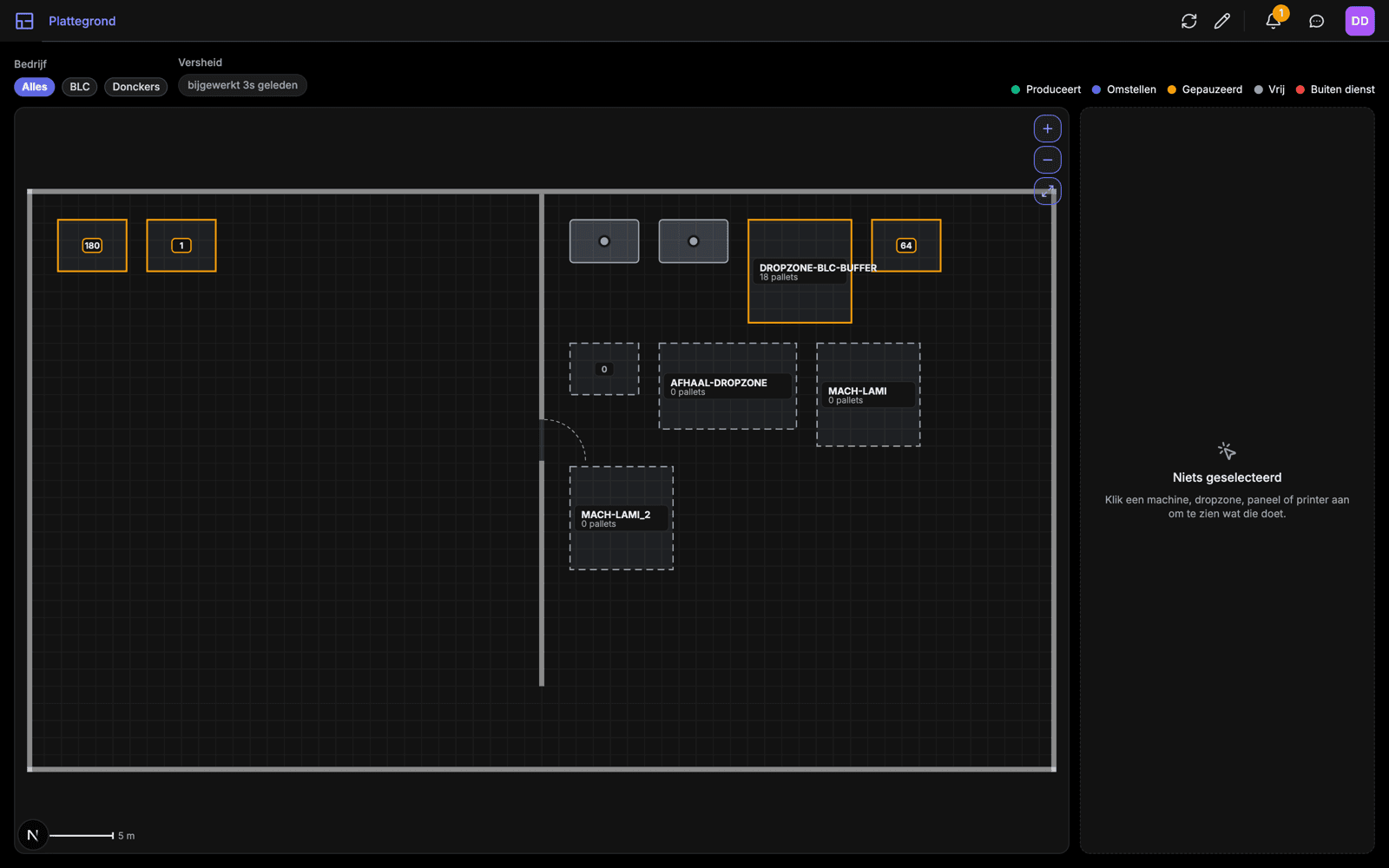
A live, scaled map of the plant
Machines, drop zones and printers drawn to measured dimensions, each showing live state — producing, changing over, paused, idle, out of service — and the pallet count currently on it.
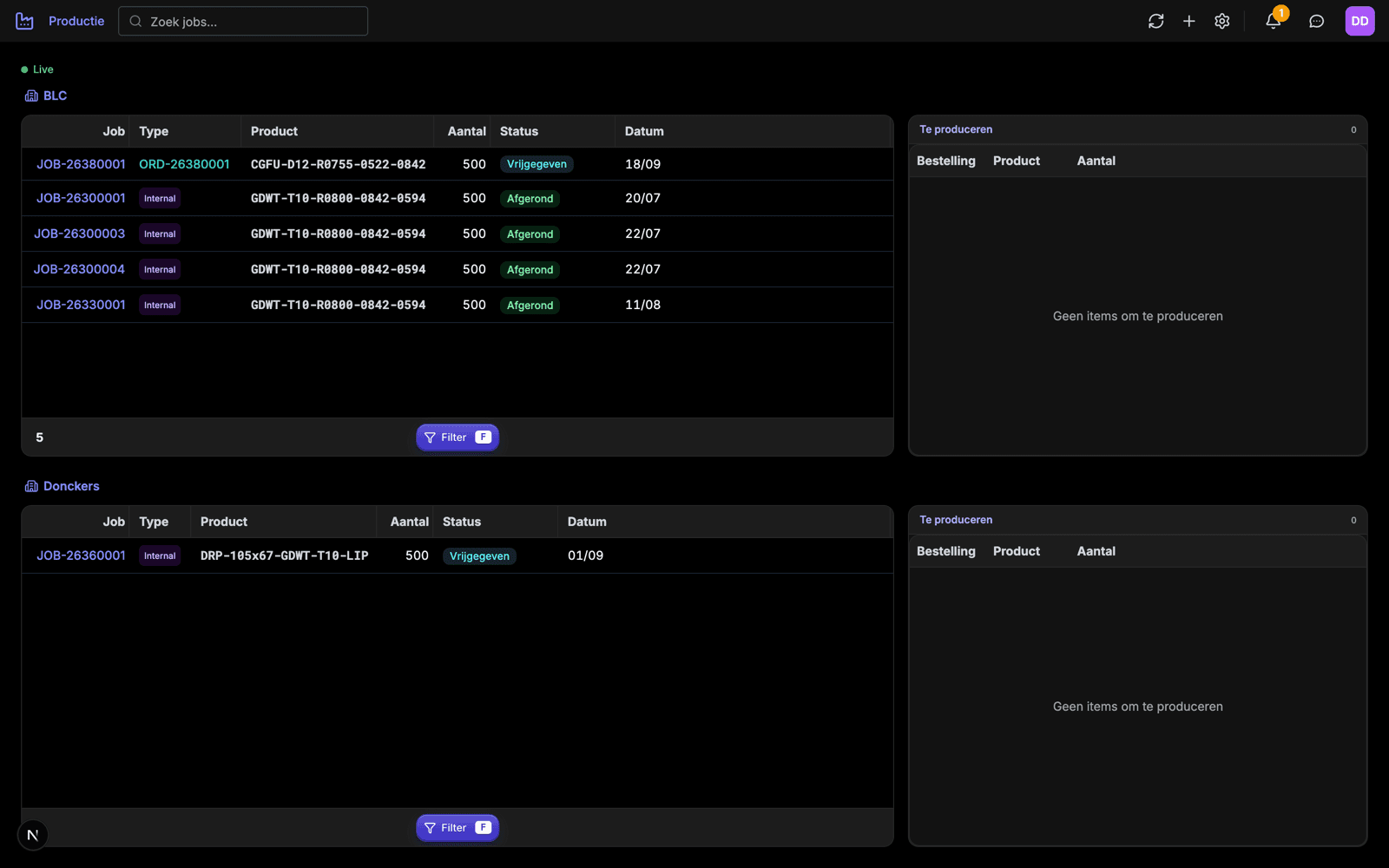
Production jobs, per company, in real time
Jobs flow from a released order or are raised internally, and the board updates over WebSocket as the floor works through them. Both operating companies are visible at once, or filtered to one.
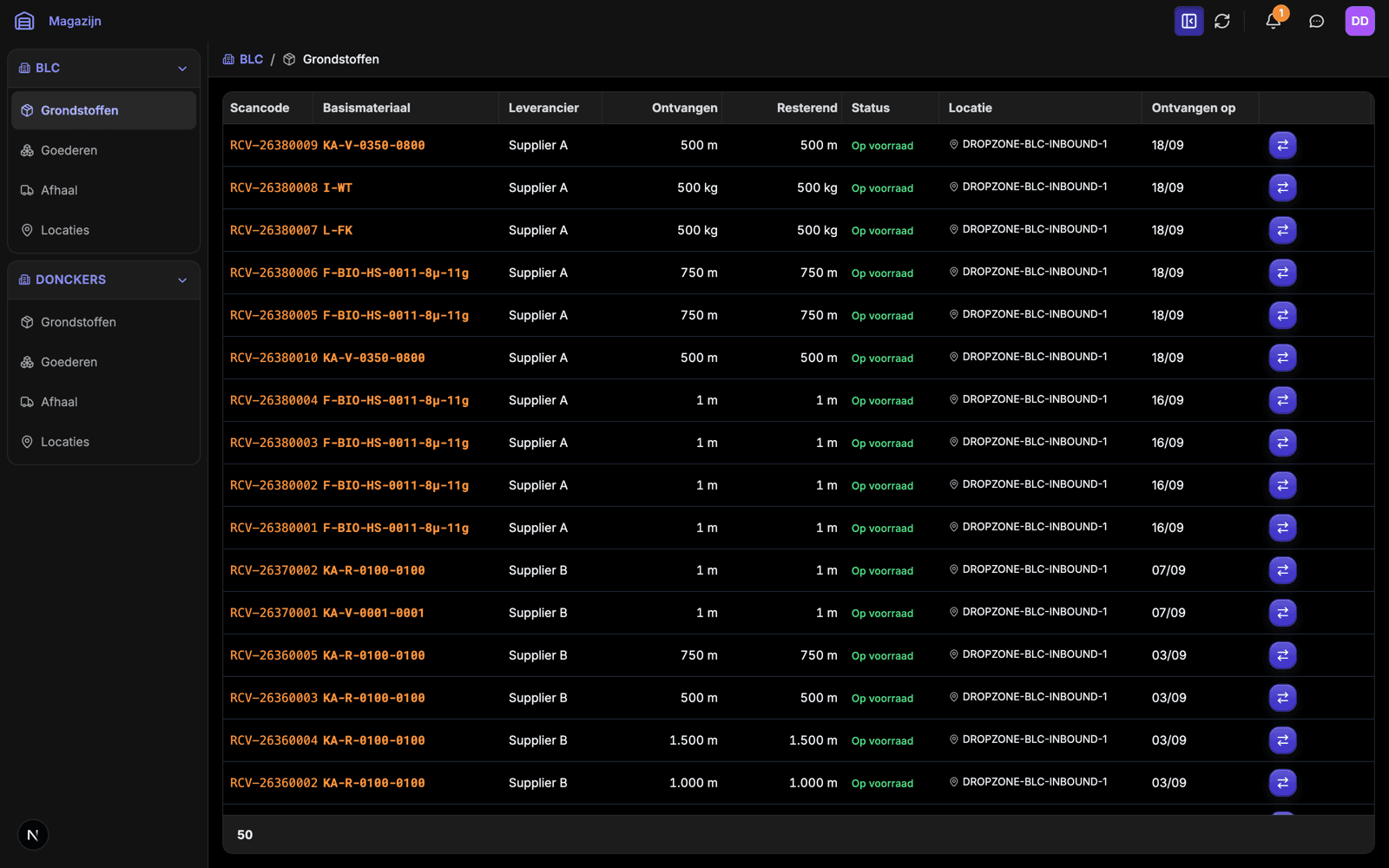
Traceability from receipt to dispatch
Every intake gets a scan code that follows the material through stock, production and out again — which is what the plant's food-safety certification requires it to be able to prove.
Screenshots are taken from a running instance. Employee and supplier names have been replaced with stand-ins.
Module map
49 modules across seven domains
Each module is self-contained: its own data, its own rules and its own permissions. It registers itself on start-up, and the interface is built from whatever registered — so adding a module is a new directory, not a rebuild.
Sales
9- Clients
- Accounts, contacts and commercial terms
- Client products
- Per-client catalogue, codes and packaging
- Orders
- Order intake through to release for production
- Order picking
- Scanner-driven picking on the floor
- Products
- Finished goods, specs and revisions
- Prices
- Price lists per client and per company
- Deliveries
- Shipments, dates and delivery status
- Dispatch notes
- Zendnotas generated from deliveries
- Invoices
- Invoicing, pushed through to Exact Online
Purchasing
4- Purchases
- Purchase orders with line-level ETAs
- Suppliers
- Supplier records, terms and contacts
- Raw materials
- Base material catalogue and specifications
- Goods receipt
- Receiving against PO, scan to stock
Production
5- Manufacturing
- Live job board per company and machine
- Workstations
- Machine registry, state and assignment
- Warehouse
- Stock, locations and full traceability
- Floor plan
- Scaled live map of machines and drop zones
- Tooling
- Dies and tooling, linked to products
Technical
5- Printers
- Label printer fleet, status and assignment
- Print jobs
- Queue, retries and what each printer produced
- ZPL
- Label templates rendered and previewed in-app
- Kiosk
- Shared floor devices running a single locked-down view
- Software tools
- Operational tooling for admins
HR
8- Employees
- Records, contracts and documents
- Time clock
- Clock in/out via NFC badge and kiosk
- Planning
- Shift grid with leave, sickness and hour totals
- Schedules
- Recurring shift patterns per team
- Competencies
- Skills and certification per employee
- Roles
- Permission sets, per module and per company
- Documents
- Signed documents with an audit trail
- Visitor register
- Sign-in with eID, safety briefing on screen
Communication
4- Chat
- Real-time messaging over WebSocket
- Notifications
- Web push and in-app alerts
- Announcements
- Broadcast to the floor and to kiosks
- Mail templates
- Transactional mail, editable by staff
System
14- Companies
- Tenants, each with its own data and rules
- Audit
- Who changed what, when, across every module
- Exact Online
- Two-way accounting sync
- Creditsafe
- Credit checks pulled into client records
- Atradius
- Credit insurance limits per client
- BRC
- Food-safety checklists and evidence
- File server
- Documents on S3-compatible storage
- Document templates
- PDF generation from stored templates
- System accounts
- Kiosk and panel devices as first-class accounts
- Module reference
- Generated docs for every module, in-app
- Software logs
- Structured application logging
- Statistics
- Cross-module reporting for management
- Software todos
- Change requests raised from inside the app
- Admins
- Platform-level administration
Architecture
Decisions that hold the thing together
Multi-tenant to the core
Two operating companies share one deployment. Every query is scoped by tenant at the service layer, and a header decides which company — or which set of companies — a request can see. Adding a third is configuration, not a migration.
Permissions per module, per company
Roles grant a named permission on a named module within a named company. A floor operator, a planner and an accountant open the same URL and get three different applications.
Built for the floor, not the desk
NFC badges at the clock, eID at the visitor desk, scanners in the warehouse, label printers driven by ZPL from the app, and kiosk devices that sign in as accounts of their own.
Everything leaves a trail
Sensitive changes are written to audit tables with the actor, the timestamp and the before-and-after. Required for the BRC food-safety certification the plant runs under.
The architecture is the documentation
Every module is the same four files — models, schemas, service, router — and registers itself. The frontend renders whatever the backend reports. A new module is a directory, not a refactor.
Ships behind a gate
Tests, type checking, linting and a production build all have to pass before a deploy is allowed. Schema changes are versioned migrations, applied in order, never by hand on a live database.
Stack
Boring technology, deliberately
Nothing here is exotic. Every choice is something a competent team can pick up, hire for, and still be running in ten years’ time.
Backend
- Python 3.12
- FastAPI
- SQLAlchemy 2.0
- Pydantic v2
- Alembic
- pytest
Frontend
- Next.js 14
- TypeScript
- Tailwind CSS
- TanStack Query
- TanStack Table
- vitest
Data & infra
- PostgreSQL
- Redis
- S3-compatible storage
- Docker Compose
- Caddy (auto-TLS)
- GitHub Actions
Integrations
- Exact Online
- Creditsafe
- Atradius
- Google Document AI
- Web Push
- NFC & eID readers
Interested in this system?
Donckers ERP is built to be deployed for more than one company. If you run a plant with the same problems — or you’re looking to acquire the platform outright — I’m open to that conversation. Full source, documentation and a walkthrough of every module included.